In today’s article, I am going to give you 10 Winter New Trend Gemini AI Photo Editing Prompts, using which you can generate trending winter season AI photos. If you are using Instagram, then friends, you must have seen this type of trending winter season photo somewhere, because many people are creating such photos and uploading them on social media. All of them are getting a very good response. Creating this type of trending portrait AI photo is very easy. Using the method which I am going to tell you, you will be able to create such photos in just one click. Friends, here we are going to use Google Gemini, and I am going to give you some of its winter season prompts. You just have to enter it on the Google Gemini website, and from there you will have to add your photo. It will convert your photo into winter style, perfect for Instagram and AI photo editing lovers.
use more viral prompts
10 Winter New Trend Gemini AI Photo Editing Prompts
You all know that winter is coming, and with this, people will be creating all kinds of photos and uploading them to social media. So, today I’m going to explain in a very simple way how you can create such a realistic photo. I’ll give you basic AI photo editing prompts, which will help you create such a photo. I’ll also tell you how to create the photo. All you have to do is read this article from start to finish. Look, here I’m going to provide boy-girl and all kinds of winter couple prompts, which will help you create these photos. Friends, when you create your photo, you need to be careful about adding a photo in which your face is clearly visible. Only then will your photo look good. Otherwise, your face will not match.
Winter Gemini Photo Editing Prompts

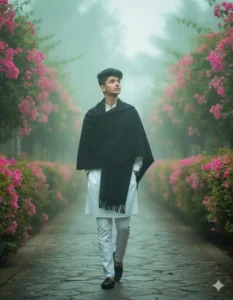
Young stylish man with a modern hairstyle is captured mid-step, walking confidently through a dreamy path with both hands in his pockets. He is wearing a White sart with a winter black shawl draped over his shoulders. The surroundings are filled with vibrant pink bougainvillea flowers and soft green foliage. The background has a soft, magical fog creating a Green atmosphere. The style is elegant, calm, and romantic. His look is natural and confident. *Face must be kept 100% unchanged from the uploaded image.
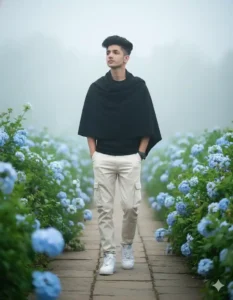
Young stylish man with a modern hairstyle is captured mid-step, walking through a path, both hands in pockets — very stylish walk with lush green foliage and abundant sky-blue flowers along the sides. He is wearing a fitted black shirt (not oversized) and a black winter shawl draped over his shoulders. He also wears off-white cargo pants and white Nike Air Jordan sneakers. His look is romantic and confident, captured in a natural, spontaneous moment. The background is filled with even more blooming flowers, and there is a thick layer of fog behind him, adding a dreamy atmosphere. The background has a soft bokeh effect of flowers. Face from the uploaded image must remain unchanged.

Transform my photo into a 8k ultra realistic, cinematic portrait of a young woman walking in autumn park, falling leaves around, stylish casual look. Full winter vibe aur fog. Keep face exact same as reference image
Winter Gemini Photo Prompts
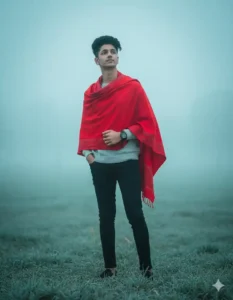
A foggy, grassy field on a moody winter morning. A young man stands confidently, draped in a red patterned shawl over a light grey sweater and black fitted trousers. One hand is casually in his pocket, while the other hand gently holds the edge of the shawl. His expression is calm, confident, and composed. The background is softly blurred with a beautiful bokeh effect, filled with mist and a cool blue-green tint from and environment. captured with a low-angle DSLR shot. showcasing a shallow depth of field, cinematic tone, and professional color grading for a dramatic, editorial look. Keep face exact same as reference image
A young woman with long dark hair, wearing a warm brown winter coat, a matching brown beanie, and a brown scarf, sitting elegantly on a snow-covered wooden park bench. She is also wearing a long white dress and white high-heeled boots. It is a snowy winter day, with gentle snowfall. In the background, there are trees covered in snow and some with delicate pink cherry blossoms. The lighting is soft and golden, suggesting either sunrise or sunset, creating a serene and picturesque atmosphere. Maintain the same face and facial features as the provided reference images.

A full-body shot of a beautiful East Asian woman in her early 20s standing in a snowy landscape at night. She has long, wavy brown hair and is wearing a long, light pink wool coat, a white knitted mini-dress, a white knitted scarf, and white boots. Her hands are in her coat pockets. There’s a fluffy white cat sitting near her feet. The background shows snow-covered trees and a soft glow of lights, with snow falling gently. Maintain the same face and facial features as the provided reference images.
Gemini Winter Prompts
Hyper-realistic 8k cinematic lifestyle portrait of a cozy winter scene of a couple sitting on a couch in a wooder cabin. The woman in a red sweater and black pants and the man in a beige cable-knit sweater and dark pants. Thekes hold steaming mugs, gazing into each other’s eyes with warm smiles, wrapped in a gray blanket. A roaring firepace with logs casts a soft glow, while a window shows falling snow outside. The mantel is decorated with a wreath, red candles, pinecones, and fairy lights. Keep exact same face as given reference pic.
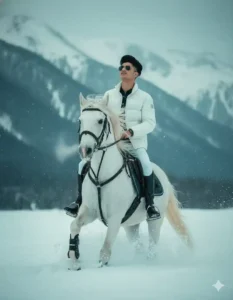
Realistic photo of a man riding a white horse in snowy mountains, both man and horse wearing winter gear, man in white winter jacket and pants, snowy background with dramatic mountain peaks, cold winter atmosphere, high detail, cinematic lighting. Keep face exact same as reference image.
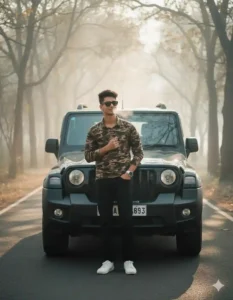
Young man in his early 20s standing confidently beside a black Mahindra Thar on a winter morning road. Light fog all around, cold misty atmosphere, soft sunlight through trees. Wearing camouflage shirt, black jeans, white sneakers, sunglasses and white smartwatch. One hand in pocket, other on chest, subtle smile. Breath vapor visible, slightly frosty surroundings, cinematic winter vibe, realistic, shallow depth of field.
Create a retro, vintage-inspired image — grainy yet bright. The girl is wearing a perfect pink cotton saree with a white blouse (sleeves above the elbow) in a Pinterest-inspired 90s aesthetic. She has silky hair with a small flower tucked visibly into her hair. She is sitting on a wooden bench, reading the Holy Bible. Winter atmosphere: soft morning fog, visible cold breath, gentle snow-like mist in the air, fallen dry leaves and winter leaves blowing slightly, cozy diffused light, subtle frost, warm natural tones with crisp cold ambience. Soft sun glow through fog, cinematic winter mood, dreamy & nostalgic.
create your photo
How to make winter AI Photo using Gemini prompts
To create this winter style photo, first of all, friends, you have to copy any one of the prompts given above. After that, you have to click on the button named Create Your Photo. As soon as you click on it, you will reach the Google Gemini website. After going there, first of all you have to login. After that, you will find a plus icon on the bottom side. By clicking on it, you have to add a photo of yours whose face you want to show in your photo. After that, you have to paste the copied prompt there and definitely turn on the Create Photo Nano button, and only then you have to send it to Google Gemini. Friends, here you will have to wait for a few seconds. Google Gemini will automatically create your photo and give it to you, by clicking on which you can easily save it in your phone’s gallery.
gf kissing prompts
Best Way To Create Realistic Images
Friends, I get a lot of comments every day in which people say that brother, we have created our photo, but it is not able to match our face completely. If you also face such a problem, then friends, you have to keep in mind that whenever you add your own photo, you have to add such a photo in which your face will be complete clearly visible, and your photo must have been take from the back camera of your phone. Because if you click a photo from the front camera, then friends, your face does not look completely real in it. Hence, you have to keep in mind that you have to click your photo only from the back camera of your phone, and only after that you have to go to the Google Gemini website and add it. When you have done this much work, your face will start matching 100 percent. And if it still does not, then friends, you can use any one of the face change websites and add your real face to your photo.
Conclusion
Friends, in this article we have tried to explain everything to you very well, and we are sure that you must have liked the method we told you the most. If you liked this method, then please do let us know by commenting, and on this website we have provided this method and many other new trending photo editing prompts which you can use to create your own photos. We hope that you must have liked them very much too, and the way we have created the photo here using 10 Winter New Trend Gemini AI Photo Editing Prompts, in the same way you can create your photo using all those prompts also.









👌👌👌👌