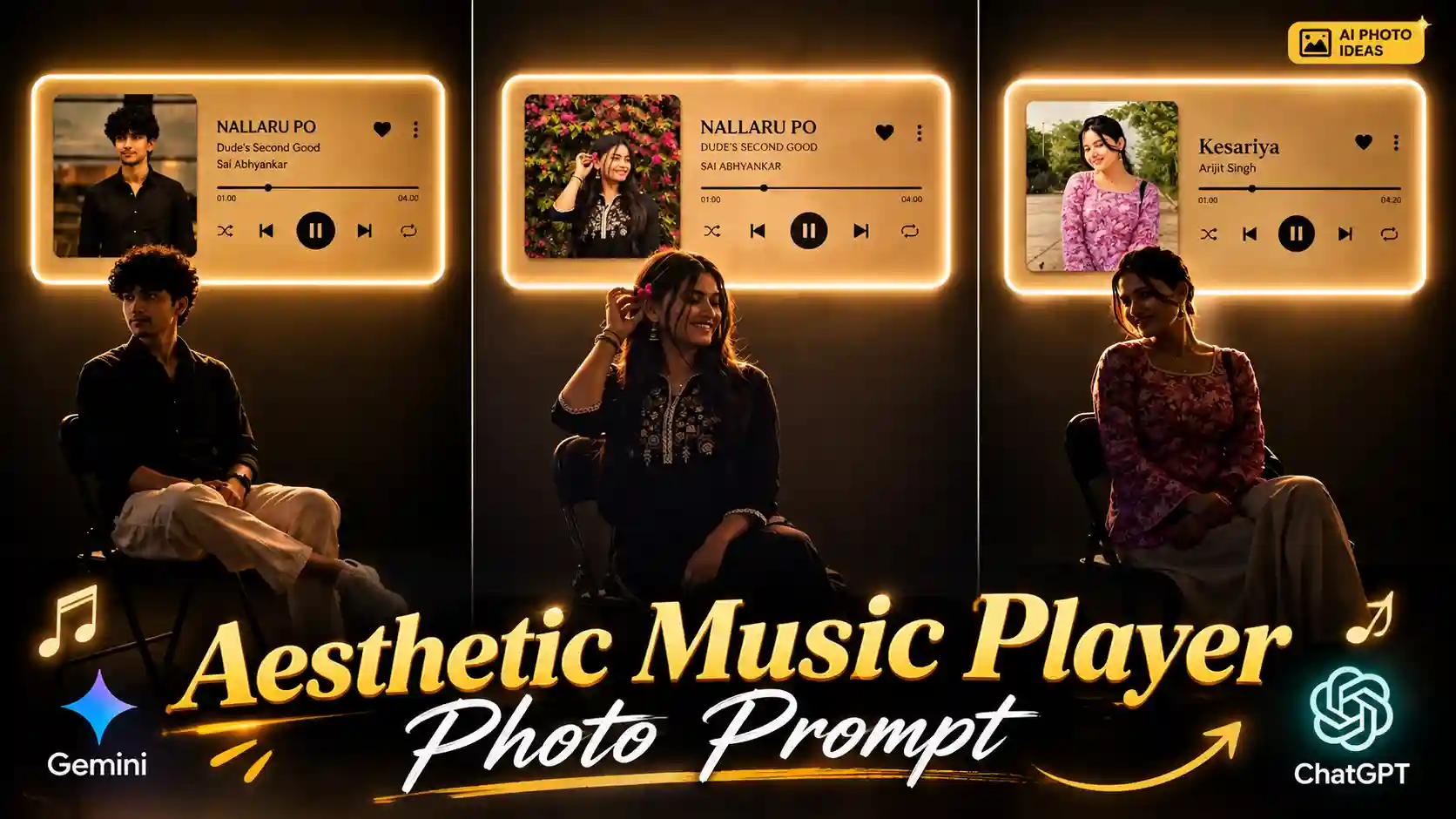
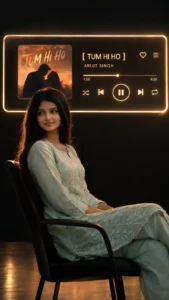
Create This Aesthetic Music Player Photo With AI – My name is Anup Sagar, and I regularly share different photo editing tips, creative AI photo prompts, and new photo trends that you can easily try with your own pictures. Recently, a beautiful photo style has been getting a lot of attention, where people are creating dark and aesthetic music-themed portraits using just one normal selfie. In this trend, the person is shown sitting casually on a chair while a stylish music player interface appears on the wall in the background. The interface usually shows the name of a favourite song along with music controls, giving the whole picture a premium and luxury feel. People are creating this photo with their own favourite songs by simply changing the song name in the prompt. The dark lighting, glowing elements, and cinematic atmosphere make the final picture look really attractive and different from normal AI photos. The best part is that creating this type of photo is actually very easy. You don’t need professional photography skills or any complicated editing software. In this article, I will explain the complete process in a simple way, and I will try my best to make sure you can also create this beautiful photo easily using your own selfie.
TERA NAAM DOON VN TEMPLATE
What Makes This Photo Trend Different?
This photo trend is mainly based on a dark, luxury, and aesthetic music theme, which makes it look completely different from normal AI-generated portraits. In this style, the person is usually sitting comfortably on a modern chair in a relaxed pose, wearing a stylish outfit that matches the overall dark mood of the picture. The background is kept mostly black or very dark, while a glowing music player interface is placed on the wall behind the person. This music player looks like a real audio player, with the song name, artist name, progress bar, play or pause button, and other music controls visible on it. The most interesting part is that you can use the name of your own favourite song in the prompt, so the music player can be created according to your choice. Soft golden or warm lighting around the interface gives the photo a premium look, while the shadows and dark surroundings create a cinematic atmosphere. The final result looks like a professional music-themed photoshoot, even though the original image can be created from just one simple selfie.
MUSIC PLAYER PHOTO EDITING
CREATE PHOTO
How to Create This Music Player Photo
Creating this photo is very easy, so let’s start with the process step by step. First, copy the photo prompt given above in this article. Once you have copied the complete prompt, open ChatGPT on your phone or computer and start a new chat. Now, you need to add your own photo as a reference so that the AI can create the image according to your appearance. To add your photo, simply tap on the photo or attachment icon near the message box and select a clear selfie from your gallery. After adding the photo, paste the prompt that you copied from this article into the message box. Make sure that your photo and the complete prompt are added together in the same chat. Now, simply tap the Send button and let ChatGPT generate the image for you. It may take a little time, so wait until the image is completely generated. Once the photo is ready, check the result and make sure you are happy with how it looks. If everything looks good, simply save the generated image to your phone and you can then use it for your Instagram post, story, profile, or anywhere else you want.
AI PHOTO CATEGORY
How to Add Your Favourite Song to the Photo?
The best thing about this photo trend is that you can add your own favourite song to the music player shown in the background. You don’t have to use the same song that is shown in the example photo. While using the prompt, you will find a place where the song name is mentioned. Simply replace that song name with the name of the song you want to show in your photo. For example, if you like a romantic song, you can add its name there, and the AI will create the music player according to your prompt. You can also change the artist or singer’s name if you want to make the music interface look more personal. This makes the photo much more interesting because you can create different versions with different songs. You can even try the same prompt multiple times by changing only the song name and create a new photo every time. So, before generating your image, just decide which song you want to add and replace the given song details with your favourite one. This simple change can make your photo feel much more personal and aesthetic.
Conclusion
So, now you know how easy it is to create this beautiful music-themed photo using just one normal selfie and a simple prompt. You don’t need any professional camera, expensive setup, or advanced editing skills to get this type of dark and luxury look. Just add your photo to ChatGPT, use the prompt given in this article, and you can create your own version in just a few simple steps. You can also make the photo more personal by adding the name of your favourite song to the music player. I hope this guide helped you understand the complete process and made it easy for you to try this trend yourself. If you liked this style, don’t forget to experiment with different songs, outfits, and poses to create something unique. So, what are you waiting for? Create This Aesthetic Music Player Photo With AI and give your normal selfie a completely new and stylish look.