

Friends, you can also do this type of photo editing very easily. Many people are already making their photos using Google Gemini, and the best thing about it is that your face is show matching in a perfect way. You must know that Google Gemini has launched a new product called Nano Banana, which people are using to create these types of viral edits. Right now, Instagram is full of this viral 3D model figure photo editing, and almost every photo is getting millions of likes. If you are active on Instagram, then you must have seen such edits everywhere. Using Instagram 3D AI Figure Photo Generator, you can also create the same trending 3D AI model editing in just one click. Today, I have brought this generator for you, and in this article, I will explain everything in a very simple way.
Google Gemini 3D Figure Ai Photo Editing Prompt 2025 | Gemini 3D Model Prompt
This photo is going viral very fast, and all the people who are making it are getting a very good response. Friends, if I tell you the truth, then it is very easy to make this trending photo. The best part is that your own photo is shown in it, and it looks exactly like a model. People like this thing very much because it also has a studio type setup. That is why I am telling you people that you should definitely make this viral photo once. For this, you will have to use Google Gemini, and you can either use its application or visit its website. I will also teach you to make it in a simple way, and everything will be explain further. When you create your photo here, it will be made in very high quality. As you must have seen, many tools reduce the quality of the photo. But this Google Gemini Nano Banana will not reduce the quality at all.
Google Gemini 3D Ai Photo Editing Prompts
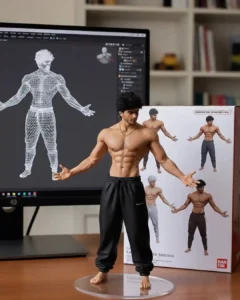
Figurine Details: A 1/7 scale figurine of a character from an unspecified “picture,” rendered in a realistic style, made of PVC, and placed on a computer desk. It should have a round, transparent acrylic base without text.
Environment Details: The background should be indoors, and the computer screen should display the brush modeling process of the figurine.
Packaging Details: A BANDAl-style toy packaging box with original artwork and two-dimensional flat illustrations should be placed next to the computer screen. A model packaging box with the character printed on it should be behind the figurine.
Create your photo
Create Gemini 3D Model Ai Photo
Look, if you also want to make this type of viral action figure photo, then now I am going to tell you in a very simple way. You have to look carefully and follow the same method. Here we are going to make our viral photo by using Google Gemini. First of all friends, you should either have Gemini app in your phone, or you can also use its website. Here we are going to use Google Gemini Nano Banana because it will convert our photo into 3D AI model photo in a very realistic way.
- First of all, click on the Create Your Photo button below to open Google Gemini.
- After that, click on the plus icon and upload your own photo.
- Now copy the prompt given above and paste it inside Google Gemini.
- Then send it there and wait for a while.
- Once the photo is ready, open it and click on the download icon.
- In this way, your photo will be saved easily.
Instagram 3D Model Ai Photo Editing
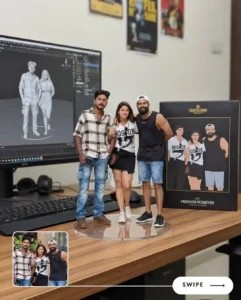
Look friends, in this type of trending photo, our own picture is show inside a 3D model toy type product. Just like when we were small children, we were give 3D toy type toys, in the same way this photo also looks like a 3D toy. Only your photo is place inside it, which makes it look very unique and cute. Many people are even using such photos while taking selfies with their friends, and in that case, the photo looks even more amazing. This is the reason why so many people are making this photo, and it is becoming popular everywhere. If you try to create this trending 3D model photo using any other tool, the result will not be good because most tools spoil your face. But the special thing about Google Gemini is that it makes your photo look completely natural and real.
Conclusion
Using Instagram 3D AI Figure Photo Generator, you can easily create this type of 3D viral photo and make yourself look like a model. Right now, this trend is fully active on Instagram, which is why I am telling you again and again to try making such a photo at least once. Friends, I truly hope that you enjoyed our article. If you liked it, then do let us know by commenting. On this website, we always bring more photo editing prompts like this. So make sure to stay connected with us.


Nice
I like it