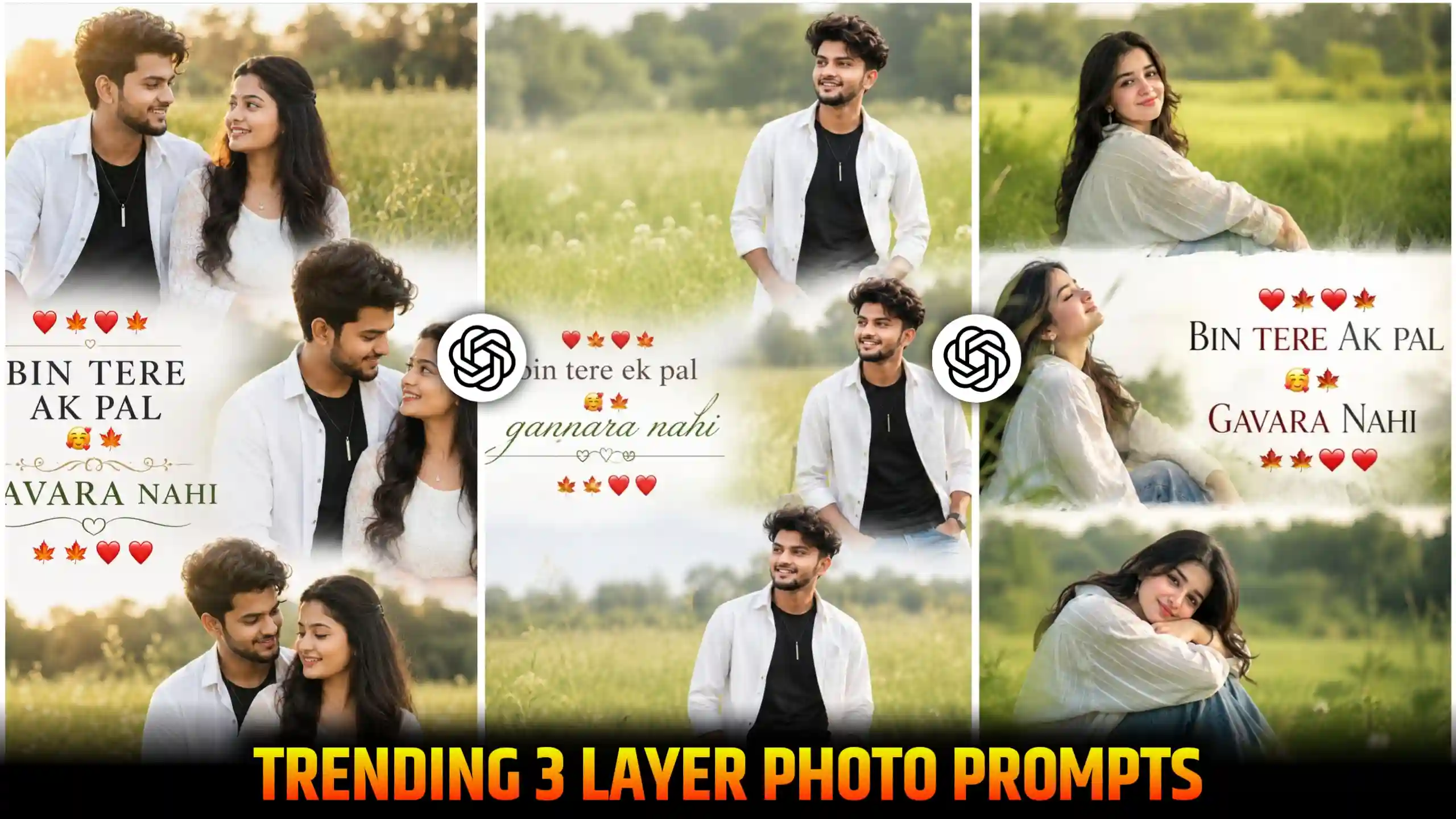
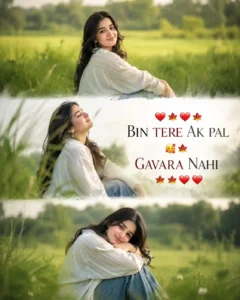
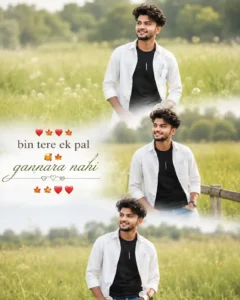
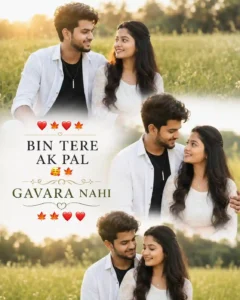
Chatgpt 3 Layer Photo Editing Prompts – Friends, if I tell you the truth, whenever I open Instagram, I see a new trading photo which is being created by many people. In the present time, people are focusing so much on the trend. As soon as any new trend comes, they start creating it. And you all know that our job is to keep giving you new trading updates so that you can follow the trend with time and keep moving forward. Friends, some photos like this are going viral. In which photos from three different angles are shown within a single photo. If I explain it to you in an easy way, then this is a 3 layer photo editing trend. In which people are showing their photos from different camera angles. But see, it is not that they are clicking all the photos themselves. They are using only one photo. And with the help of AI tools, convert it into a three layer photo like this. We are doing this. And you must be aware that whatever we say to AI with the help of prompts, it will convert our photo in that way. So, in today’s article, we will give you a complete guide on how to create this type of three layer photo. And will tell you the easiest way to create it.
New Trend: Instagram Milestone Poster Prompt
What is 3 Layer Ai Photo?
Let us understand all the things in a simple way. Look, these AI tools like Google Gemini, chatgpt, grok ai, friends, have just arrived in the beginning. At that time, people used to create this type of three layer photos manually. And if I tell you the truth, it was very difficult to create them. Because in this, we had to click the photos from our own three angles. Like many people used to click one photo from the front and the other photo from the front. He used to click from the side angle. And the third photo was clicked from the opposite side. So, in this way, when he had three photos of different styles, then he would take those photos to any editing application like picsart or autodesk and make them of collage type. In which one photo would be shown at the top side. The second one would be shown below it. And the third one would be shown at the bottom. And after that, he would make it ready by applying some filters. But if I tell you the truth, this work was done by the same person. The one who had the knowledge of editing knew how to do it in a perfect way. Otherwise, the one who did not have much knowledge could not do it in such a good way. But friends, today when AI photo creating tools like Google Gemini, chatgpt have come, then this thing has become very easy. Now we do not need to click photos from different angles. We simply need a selfie photo. Which we give to the AI tool. And after the prompt. If we tell him through this method, he creates and gives us a three layer photo like this. And the best thing about it is that it gets blinded in such a perfect way that it looks absolutely cinematic and aesthetic. That’s why I told you that AI tools have made editing very easy in today’s time. And in today’s article, I will tell you how you can create such 3 layer photos with the help of AI tools.
3 Layer Girl Prompt
3 Layer Boy Prompt
3 Layer Couple Prompt
How to create 3 layer photo with chatgpt prompt?
Look, as I have already told you that if you manually edit this type of photo yourself, then it takes a lot of time. And still, you will not be able to blind your photos with each other in such a good way. Due to which your photo will not look very professional. If you people want to create your photos in a very professional and aesthetic way, so that each of your photos gets blinded with each other in a good way, then for this, friends, you will have to use AI. And for this, I find chatgpt to be the most perfect.
Because it generates our photo in very high quality. And at the same time, it matches the details of the photo in a perfect manner. Due to which our photo looks very detailed and aesthetic. It seems as if we have clicked our photo with a very expensive camera. And then went to a big studio and converted it into 3 layers. So for this, look for the chatgpt prompt here. I will give it to people. And you will have to paste it on chatgpt. I will explain it to you step by step below. You will be able to do this work very easily.
- First of all, look carefully at the photos given above and select the photo style you like, then copy the prompt given below it completely.
- Now open the ChatGPT application.
- On the bottom side, you will see a plus (+) icon, click on it.
- Upload your selfie photo there.
- Now paste the prompt that you copied.
- After pasting the prompt, send it to ChatGPT.
- Now wait for a while, ChatGPT will start processing your photo.
- After some time, your 3 layer photo will be created and will appear in front of you.
- Click on the photo to open it, then click on the save icon to save it in your phone’s gallery.
- In this way, you can easily create a 3 layer photo for Instagram in a very short time.
Must Create: Ghost GF Photo Editing Prompts
How to edit such photos manually?
See friends, I have taught you to create this type of 3 layer photo with AI, but if you want to create this photo manually yourself, then for this, you people will have to keep some steps in mind. For this, the first thing you have to do is that you will have to click three of your own photos. And these three photos should be from different angles. Like you can get one photo clicked from the front. One photo can be clicked from your side profile. And you can get the third photo clicked looking back. Or you can take three of your photos in whatever pose you like the most. After that, you have to open any photo editing application. If you want, you can also use PicsArt. After opening it, you get to see an icon of a collage there. Then you have to select it. And after that, you have to add these three photos of yours. Now see, there are many frames in front of you. In whichever frame you want to keep your photo, you can keep it. Once you select the frame, after that, if you want, you can also write some text on your photo. Otherwise, you can also save it in your phone’s gallery by clicking on the save icon. See, this will create a 3 layer photo of yours, but it will not look as cinematic as the photo made using the prompt. Still, you can definitely try it once.
Conclusion
These 3 layer trending photos are very popular. And friends, I have tried my best to explain every step to you in a good way. If you have read our article very carefully, then you can also generate your 3 layer trending photo very easily. And you will not face any problem in this. With the prompts that we have given you here, your face will match well. And there will be no hassle in creating the photo. There will be no problem. We have designed them in such a way that the details in your photo match perfectly. And we have designed them in such a way that apart from this, friends, if you want any other type of trading prompt from us, then you can also tell us by commenting below. Otherwise, you can also message us on our Instagram whose username is anupsagar.editz. We will try our best to deliver that prompt to you.