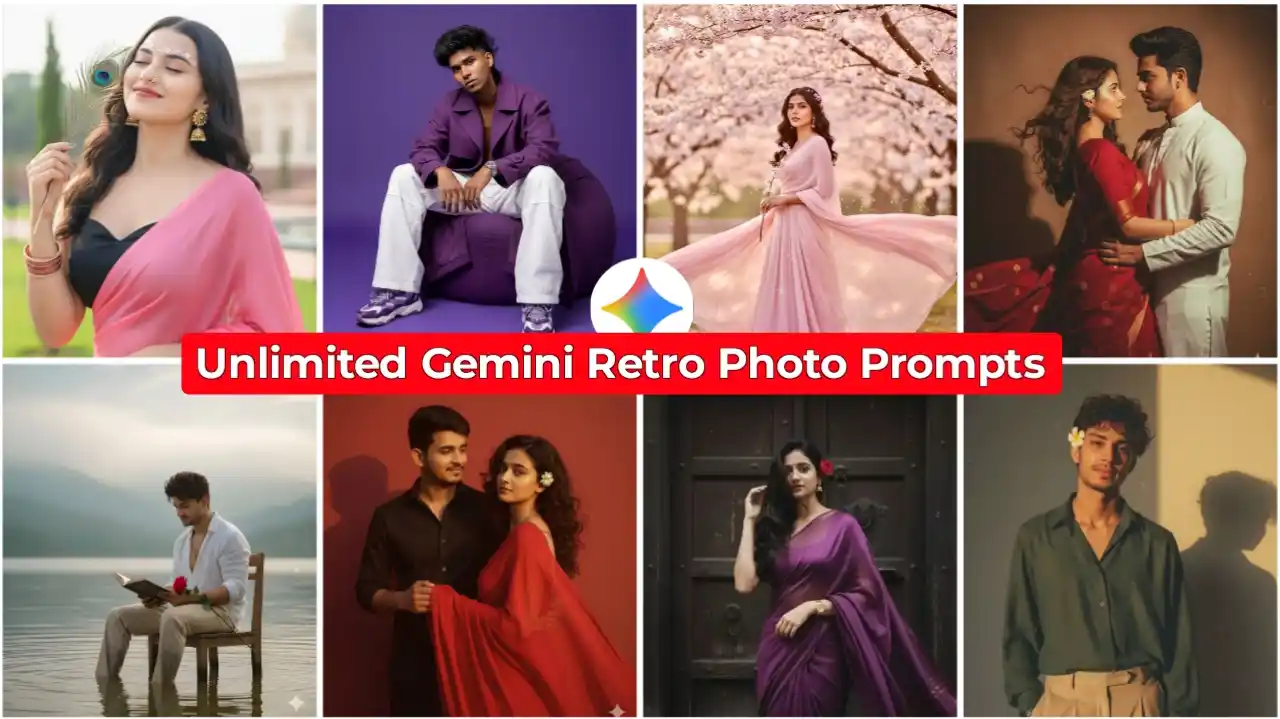
Friends, in today’s article, I’m going to give you unlimited Google Gemini photo editing prompts. Using these, you can create your own fully viral, trending photos. And look, I’m going to give you a lot of different types of Gemini nano banana photo editing prompts. You can create as many different types of your own photos of different scenes as you want. Friends, you must have seen how retro-style and Google Gemini photos are going viral all over social media these days. So I thought, why not bring you prompts for all the most viral photos of this type. In today’s article, I’m going to give you all those trending Google Gemini photo editing prompts that have gone viral the most. These have been created the most by people. In this article, I’m also going to give you some new photo editing prompts. So you have to read the article from the beginning to the very end.
Gemini iPhone Photo Prompt
Unlimited Google Gemini Photo Editing Prompts | Gemini Viral Prompts
In this article, I’m going to give you all kinds of Google Gemini photo editing prompts. So you can create couple photos if you want. And if you want to create your own single photo, you can do that too. As you may have seen on Instagram, people are creating different types of photos. Some are creating retro photos. Others are creating photos of themselves during the rainy season. So, whatever type of photo you want to create, friends, first you need to copy its prompt. Once you’ve copied the prompt, you need to go to the Google Gemini website and paste that prompt. And most importantly, at that time, you also need to send the photo of the person whose face you want to fully display in your photo. That means you need to send your own photo. In this way, you can create your photo using all these AI photo editing prompts.
Google Gemini Photo Editing Prompts
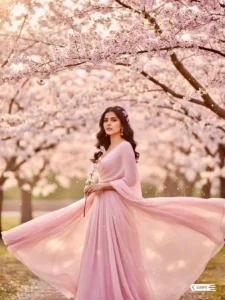
There’s an undeniable magic in the soft blush of cherry blossoms – a dreamy haze, delicate textures, and that sweet hint of nostalgia only spring can bring. Exploring scenes like these in Al feels like capturing a fleeting story in full bloom. If this gentle mood inspires, follow for more visuals and prompt experiments in bloom!

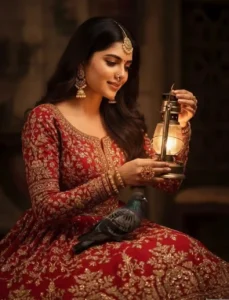
Convert this potrait into a warm, color portrait of a woman seated in a low-lit, indoor setting, holding a lit lantern. She is looking down at the lantern with a gentle, soft expression, and her head is tilted to the side. She is wearing a beautiful, traditional red outfit with intricate gold embroidery. The sleeves are long and fitted, and the skirt is full and voluminous. Her hair is styled in long, soft waves. She is adorned with several pieces of ornate jewelry, including a maung tikko on her forehead, a nath (nose ring), and a large ring on her finger. A small, dark-colored bird, possibly a dove or a pigeon, is perched on her lap. The background is dark and out of focus, creating a dramatic, mystical atmosphere. The soft glow from the lantern illuminates her face and hands, highlighting the rich colors and textures of her clothing and jewelry. The overall feel is romantic and intimate.

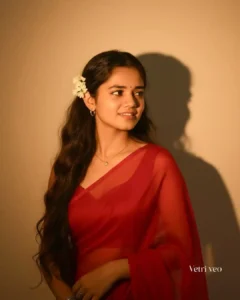
Convert, 4k HD realistic, A stunning portrait of a young Indian woman with long, dark, wavy hair cascading over her shoulders. She is wearing a translucent, elegant red saree draped over one shoulder, revealing a fitted blouse underneath. White flowers are tucked behind her right ear. She is wearing minimal jewellery. She is looking slightly to her right, with a soft, serene expression. I want same face as I uploaded no alternation 100 percent same. The background is a plain, warm-toned wall, illuminated by a warm light source from the right, creating a distinct, soft-edged shadow of her profile and hair on the wall behind her. The overall mood is retro and artistic.

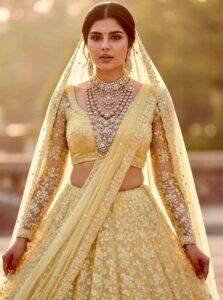
Create A soft, sunlit portrait of my face wearing a flowing sheer plain pastel yellow net tulle lehenga with intricate sequin work embroidery all over the lehenga, heavy voluminous with full sleeves sheer net blouse pastel yellow and sheer net pastel yellow dupatta draped diagonally. And sheer pastel yellow net dupatta draped at the back of her head as a long veil.She is wearing multiple layers of kundan and polki with diamond jewllery, 5-6 layers of necklaces and heavy long earrings.

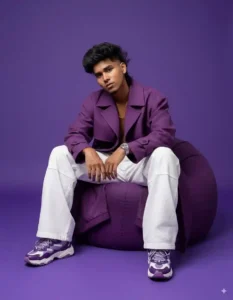
Hyper-realistic cinematic full-body fashion photoshoot of the uploaded person (age 25, height 5’5″), with the exact face and medium-length wavy hairstyle from the uploaded image, perfectly styled. Seated on a deep purple bean bag, leaning slightly forward with elbows on knees, wearing bold all-purple oversized streetwear: structured trench coat, wide white pants, chunky sneakers, silver watch. Solid purple background. Face looking directly at the camera with subtle confident expression. Dramatic studio lighting emphasizing textures and folds. Adidas campaign editorial vibe with cinematic depth of field and powerful drip aura.
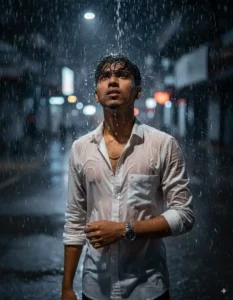
A hyper-realistic cinematic portrait of me standing in the rain at night (preserve face and hair 100%). My hair is wet and tousled, raindrops glisten on my face, and i gazes upward with an intense, feel the rain. I wears a soaked white button-up shirt clinging to my body, and a luxury wristwatch gleams on his wrist. Dramatic moody lighting, deep shadows, water droplets frozen in motion, photography style.
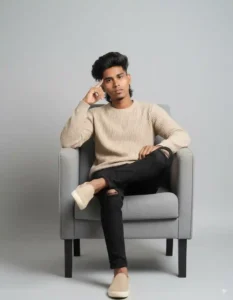
A young man sitting in a modern grey armchair, with a light grey background. His face and hairstyle are like the reference image, wavy black hair with subtle highlights, trimmed beard, calm and thoughtful expression. Wearing a beige ribbed sweater, black pants slightly ripped at the knees, and beige sneakers. One hand lightly touching his forehead/ chin, the other hand resting casually. Neutral tones, soft lighting, clean, minimal, modern look.
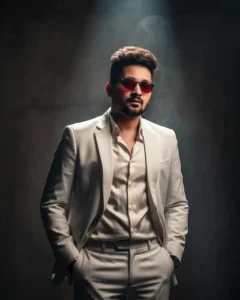
Hyper-realistic editorial portrait of the uploaded person in a fitted white suit with silk shirt. Standing under spotlight, smoke drifting, hands in pockets, confident expression.
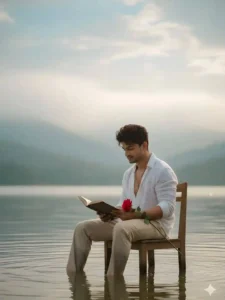
A cinematic, realistic portrait of luploaded image sitting on a simple chair placed in the shallow water of a calm lake, He is wearing a slightly open white shirt with rolled-up sleeves and light beige trousers, wet from the water, He holds an open book in his hands and a single red rose resting on his arm, adding a poetic touch. His curly hairstyle is natural and stylish. The background shows misty hills and a soft cloudy sky, creating a dreamy, moody, and aesthetic vibe. The water gently ripples around the chair, reflecting light, Highly detailed, realistic lighting, natural colors, soft depth of field.
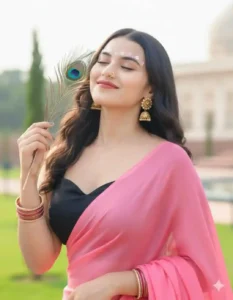
Transform this photo into a graceful portrait: Shot at a slightly low angle, with the head gently tilted upward. Eyes closed, wearing a soft, joyful smile. A delicate peacock feather placed near the face. Adorned with intricate golden earrings on the left ear. Above the eyebrows, add tiny floral bindis in white and pink forming a subtle flower design makeup look, a nose ring Outfit: a black colour sweetheart neck blouse paired with a pink sari draped elegantly over the shoulder. Both wrists decorated with numerous bangles, adding a touch of tradition. Background: a softly blurred outdoor daytime setting, with hints of greenery and light-toned structures, evoking a bright, serene atmosphere. Ensure the face cut remains sharp and unchanged, highlighting natural beauty.

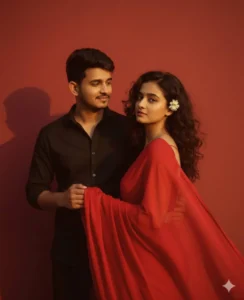
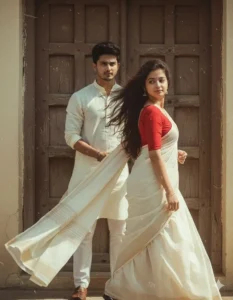
He will be holding my saree pallu in his hand, dressed in a retro style with a black shirt, carrying a Dev Anand-inspired look. I will be in a perfect plain chiffon saree, red in color, giving a Pinteresty aesthetic retro vibe. Think of a 90s movie feel — dark brown wavy curly hair with a small flower tucked visibly into the curls, romanticizing in a windy environment. I’ll be standing against a solid wall with deep shadows and contrast drama, creating a mysterious and artistic atmosphere. The lighting will be warm with golden tones, evoking a sunset or golden hour glow. The background will stay minimalistic and slightly textured, while my expression will be moody, calm, yet happy and introspective.
Create a retro, vintage-inspired image – grainy yet bright – based on the reference picture. 510 The girl should be draped in a perfect off-white cotton saree with a red blouse. Pinterest-style aesthetic saree. The vibe must capture the essence of a 90s movie dark brown-haired baddie, enhanced by a windy, romantic atmosphere and the guy should be wearing an off white kurta She stands against an old wooden door, where deep shadows and dramatic contrasts add mystery and artistry to the scene, creating a moody yet enchanting cinematic effect. Make the girl pose like she’s walking and looking back while the guy is holding her saree pallu very evidently and the guy should be looking at the girl.
How To Create Your Photo Using These Prompts
Friends, if you like any of the photo editing prompts that I have given you above and you want to make your own photo in which your face also matches perfectly, then friends, right now I am going to explain it to you in a simple way step by step below. You have to keep in mind that first of all, you should have a photo in which your face is clearly visible. Because you will have to send that photo to Google Gemini. Only then Google Gemini will keep your face in your photo. After that, friends, you have to follow all the steps given below.
- First, choose any of the photo editing prompts above.
- Then copy that prompt and click on the Create Your Photo button.
- As soon as you do this, you will reach the Google Gemini website, where you have to login first.
- Friends, you will find a plus icon at the bottom, so click on it and add your photo.
- Then paste your copied prompt there and click on the send icon.
- Wait a while here, when the photo is ready, click on it and download it.
Gemini Couple Photo Editing Prompts
While I’ve already provided you with plenty of couple photo prompts in this article, if you’d like me to share more innovative photo editing prompts that will allow you to create these kinds of photos with your couple, making them look incredibly realistic and cinematic, let me tell you. If you haven’t already, friends, we’ve written other articles on this website. In those articles, I’ve provided couple photo editing prompts. As you may know, a retro-style couple trend has emerged. So I’ve written a dedicated article on that. In that article, I’ve also provided you with only retro-style couple photo editing prompts. If you want to go to that article, click the button below. Clicking on it will take you to the article. Using those prompts, you can create your own photos in this way.
Conclusion
Friends, in this way, you can create your photos using as many photo editing prompts as you want. And friends, we have given more such prompts on this website. So you can also create different photos of that type by clicking on those articles. We hope that you must have liked this article of ours very much. So if you liked it, then please do let us know by commenting. And if you want any other type of photo prompt, then tell us about it by commenting. We will also provide that photo prompt in the next article.




Mara photo vi upload kar do
Men
New ai photo
Very nice
Miss you
I am Ayaan
Ai photo editing please