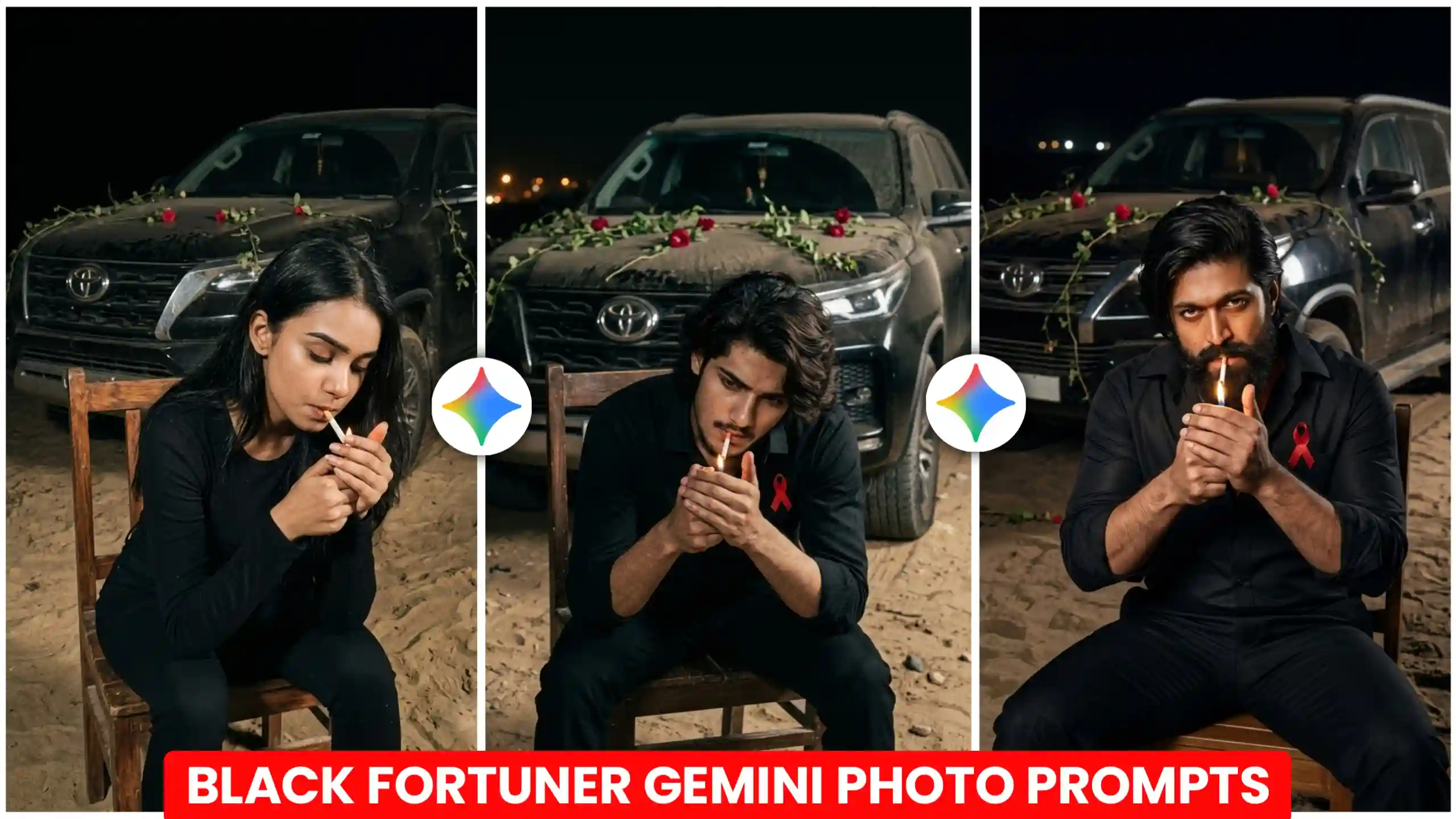
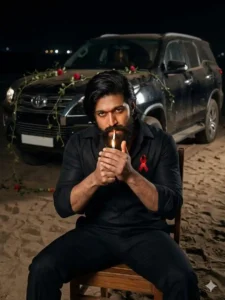
We have brought you the currently trending “Black Fortuner Attitude” AI photo editing prompts. Using these specific prompts, many people are creating personalized images of themselves. Specifically. Photos where they appear seated on a chair in front of a black Fortuner. Their poses exude a distinct “attitude-filled” style. Giving the resulting images a powerful and captivating aura. Such photos are currently being created in massive numbers across Instagram and Facebook. Therefore. In today’s article, we will guide you on how you can easily create your own version of this Fortuner-themed photo. Featuring a Fortuner car parked behind you. Using just one of your own selfies. To achieve this, we will be utilizing Google Gemini. As it excels at generating images in a completely natural and realistic manner. Ensuring that your face is seamlessly and perfectly integrated into the final result. As you all already know. My name is Anoop Sagar. And I am constantly bringing you genuine. Trending photo prompts like these right here on my website.
Black Fortuner Attitude AI Photo Editing Prompts
Friends, I will certainly explain later how you can create your own photos featuring a Fortuner in this style. But before we get to that. Let’s discuss the details of this specific image. Specifically, what makes it so unique and special. Here is how it works. You are seated on a wooden chair, dressed in black trousers, a black shirt, and black shoes. Essentially, your outfit is simple and dark-colored. Standing directly behind you is a black Fortuner, adorned with floral garlands. Much like how people typically decorate their cars, adding a festive touch. The scene is set at night. Consequently, when you look at this image, it exudes a distinct “attitude” or swagger. That is why, whenever anyone comes across a photo like this, they instantly like it. And are inspired to create a similar one for themselves. When I first saw this image, it looked completely authentic to me. As if the person in the picture had actually posed for a real photograph. However, after doing a bit of research, I discovered that people are actually creating these images using Google Gemini. I then crafted a specific “prompt”. Which I will share with you below. To teach you exactly how to generate photos just like this one.
Prompt For Boys
Prompt For Girls

How to create photo with black Fortuner.
To create a photo featuring yourself alongside a black Fortuner like this, friends, the very first step is to take a picture of yourself. Yes, you heard me right. You need to take a photo where your face is clearly visible, as this is the only way Google Gemini will be able to accurately match your facial features. Once you have taken your photo, you need to fully copy the prompt provided above. Next, click on the button labeled “Create Your Image.” Alternatively, you can use the Google Gemini application directly. Once inside Google Gemini, tap on the plus (+) icon. And select the photo of yourself that you just took, ensuring your face is properly captured for matching purposes. Then, paste the prompt you copied earlier into the text field. Finally, locate the option labeled “Create Image” (or a similar button). And click on it to send the request to Google Gemini. Now, simply wait a few seconds. Your customized image will be generated shortly, after which you can click to view it and save it to your device.
Can we add another car to this?
Friends, take a look. The prompt I am about to share with you here will generate a photo featuring a black Fortuner car when you use it to create your own image. Now, I realize that everyone has unique tastes. And not everyone is a fan of the Fortuner. You might prefer a car from a different manufacturer. Perhaps a sports car or a luxury vehicle. So, if you wish to replace the Fortuner with a different car of your choice, you can do so very easily. To do this, simply take the prompt I have provided. When you go to create your photo by pasting it into Google Gemini, look for the specific mention of the “Fortuner.” Wherever you see “Fortuner” written, delete it. And replace it with the name of the car you actually want to feature in your image. Additionally, you can specify the color you desire. Just as we specified a “black Fortuner” here to obtain a black car, you can customize both the car model and its color within the prompt to suit your preferences. And then generate your photo. By doing this, your favorite car will be seamlessly incorporated into your image.
Conclusion
In this way, friends, by utilizing the “Black Fortuner Attitude AI Photo Editing Prompts,” you can generate a photo of yourself alongside your dream car. Specifically, the Fortuner. The resulting image will exude a distinctively stylish and “attitude-filled” vibe. Furthermore, as I mentioned earlier, you are free to replace the name of this specific car with that of any other favorite vehicle of yours. To create a personalized photo featuring that particular car instead. We sincerely hope that you thoroughly enjoyed today’s article. If you did find it helpful, please do let us know by leaving a comment below. We will continue to publish similar content on this website. And we are confident that you will enjoy those future posts just as much.