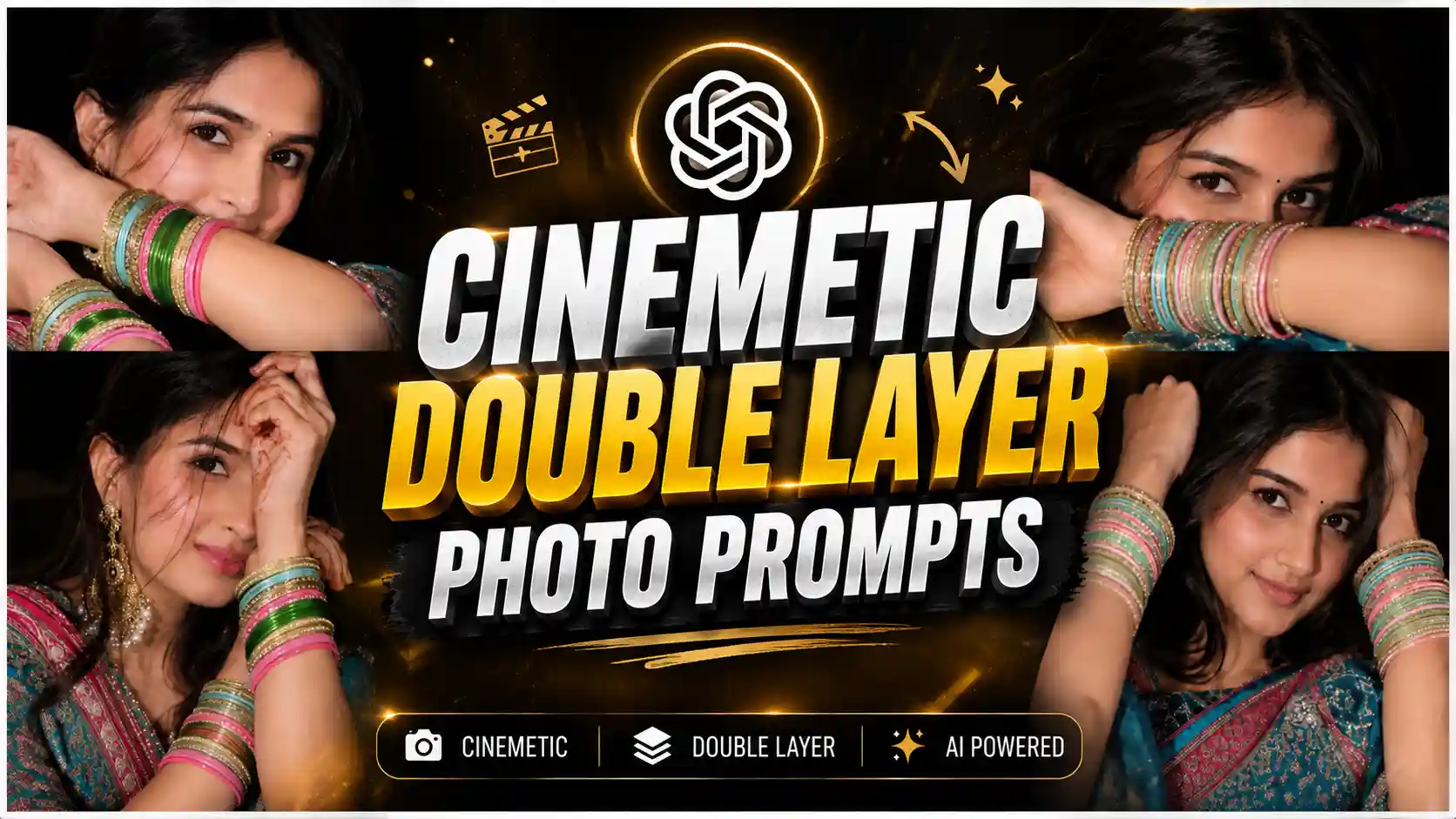
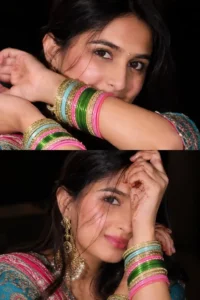
Double Layer Girl Photo Editing Prompts – Recently, I was scrolling through Instagram, and there I came across double layer girl photos, which means, friends, a kind of new trend has come on Instagram, where many people, especially girls, are creating double layer photos, and this is a kind of close-up cinematic photos in which they are wearing green colored suit and bangles. In this, she looks very cute, and the overall look feels very aesthetic and eye-catching. You people must have seen the three layer trend, in which only there are three frames inside the photo. Similarly, friends, this one is also a trend, but only two frames are shown to us, which makes it simple but very attractive. This is a flower trading photo, and it is becoming very popular on Instagram these days, because people love this type of creative editing style. Many creators are making these photos and getting good engagement on their posts. And in today’s article, we will teach you how you can create your own viral double layer photo, that too in a very cinematic way, step by step, in a very easy method.
New Trend: Viral Sunset Photo Prompt
Double Layer Cinemetic Photo Prompt
Ever since people have started creating photos using AI prompts from Google Gemini and ChatGPT, friends, every single day a new photo editing trend comes on social media, which is much more unique than the previous one, and it is very viral. Many people like it and create their own photos of that type. Similarly, friends, this is also a double layer photo trend. Many people are engaged in creating it in the present time, and its special thing is that most of the girls are making this because it looks very cinematic and aesthetic type. In this, friends, she is shown with a very close-up frame, and there are different angled poses in both the frames. In the top photo, she is covering her face with her hand, and the green bangles worn in her hands are visible, and in the bottom photo, she is keeping both the hands on the back side, due to which she looks even cuter, and overall, this is the whole photo becomes very happy and romantic vibe, that is why many girls are liking it very much. Friends, in today’s article, we will tell you how you can create your own trading double layer photo. Look, here we are going to create it using ChatGPT because it will create our photo in a very detailed manner.
Create Your Photos
How To Use Double Layer Photo Prompts ?
If you want to create your own photo using the double layer photo prompt that we have given, then friends, first of all, you have to make a full copy of it. To copy, you have to click and hold on the prompt and then select the full photo and copy it by clicking on the copy icon. After that, friends, to create a photo from it, you have to open the ChatGPT application and click on the plus icon given there and add your own selfie photo. You just have to see your face clearly, and then you have to paste the copied prompt there, and then, friends, you have to send it to ChatGPT. Now, you will have to wait for a few seconds there. After some time, your photo will be created and will appear in front of you. Then you can easily see it by clicking on that photo and can also save it in your phone’s gallery by clicking on the save icon. In this way, you will be able to create a trading double layer photo.
More Prompts: View Most Viral Photo Prompts
How to Customize Double Layer Photo Prompt ?
Look, if you want to create a normal photo, then you can use the prompt given by us as we have given. You just have to copy it and paste it on ChatGPT to create your photo, but, friends, if you want to customize something in your photo or want to replace something by add, then you can do this very easily. For this, friends, you will have to customize the prompt, like if you have given in this photo. If you want to change the color of the suit, then you have to see where the suit has been described in the prompt, and after cutting the green or whatever color given there, you have to write the name of your favorite color, then when you click your photo, only the suit with your favorite collar will appear in that photo. If you want to change the pose of the hand, then you can do that very easily. You will have to customize it as per your requirement. You will have to remove the first one. At the same time, friends, if you want to change the overall vibe of the photo, then you can do that too. For that, you can keep soft light in the photo. You can also keep golden hour light, or you can also keep dark cinematic tone. In this way, friends, whatever you want to change in the photo, you just have to remove the command already given in the prompt and enter your favorite command. In this way, your photo will be generated as per your wish, and you will get it.
Conclusion
If you want to create your own photo using the double layer photo prompt that we have given, then friends, first of all, you have to make a full copy of it. To copy, you have to click and hold on the prompt and then select the full photo and copy it by clicking on the copy icon. After that, friends, to create a photo from it, you have to open the ChatGPT application and click on the plus icon given there and add your own selfie photo. You just have to see your face clearly, and then you have to paste the copied prompt there, and then, friends, you have to send it to ChatGPT. Now, you will have to wait for a few seconds there. After some time, your photo will be created and will appear in front of you. Then you can easily see it by clicking on that photo and can also save it in your phone’s gallery by clicking on the save icon. In this way, you will be able to create a trading double layer photo.