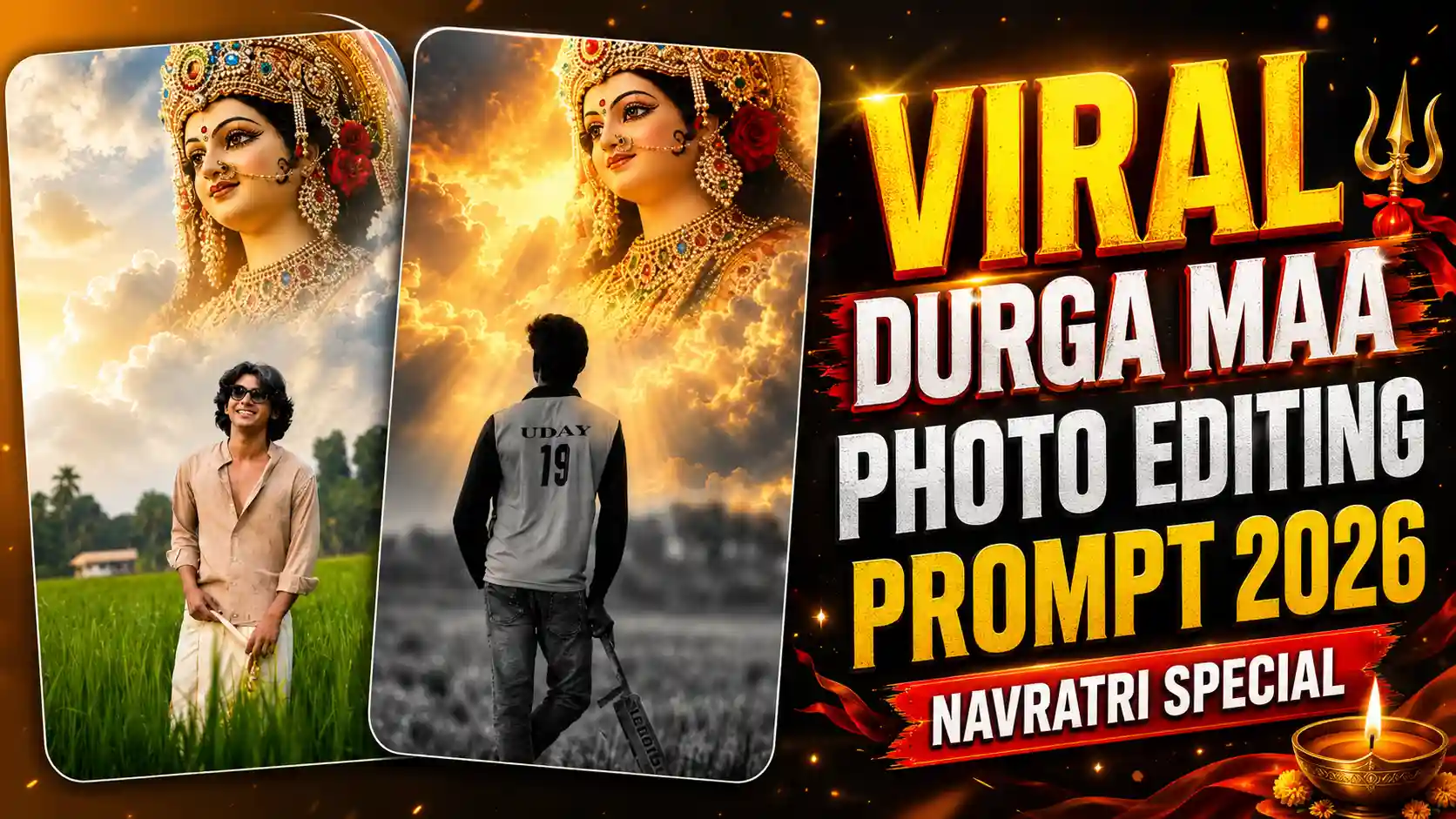
Durga Maa in Sky Photo Editing Prompt – Nowadays this Mata Rani photo is going very viral on social media, specially during Navratri. In this photo you can see a boy standing in a field with a cricket bat in his hand and a big image of Mata Rani is showing in the sky. There is golden light coming from behind Mata Rani and clouds are looking very beautiful, which makes this photo more attractive. The boy is wearing a jersey and his name and number is written on the back side. The boy part is looking black and white and Mata Rani side is full of colours. This is the reason why people are liking this photo so much and many people are making this type of photo for their social media. If you also want to make this type of photo with your own face then don’t worry because today I will tell you how you can create it very easily. You don’t need to know any photo editing and no need to use any difficult software for this. You just need one PROMPT and follow some simple steps, that’s it. After doing this you can also make your own Mata Rani photo and share it with your friends on Instagram or Facebook. So read this article till the end because I will explain the full process in easy way.
AI GIRL VIDEO EDITING
In this viral Navratri photo trend, there are many things which makes the photo look different from normal photos. First you can see a boy standing in a big open field and he is holding a cricket bat in his hand. The boy is wearing a cricket jersey and his name and jersey number is written on the back side, so it looks like a real cricket photo. The ground and the boy are mostly shown in black and white colour, which gives a different type of look to the image. Now the main thing is in the sky, where a very big and beautiful image of Mata Rani is shown between the clouds. The sky has golden and orange light and the sunlight is coming from behind Mata Rani, making the whole scene look very beautiful. There are also some dark clouds around the sky which makes the background more attractive. The photo looks like the boy is standing in front of Mata Rani and taking her blessings. Because Navratri is going on, many people are liking this type of photo and creating it with their own face. The best thing is you can make this photo in your own style by changing your face, jersey name and number.
Use This Image as Reference
CREATE PHOTO
How To Create This Viral Mata Rani Photo Using ChatGPT
So now lets learn how you can make this viral photo with your own face. First of all you have to select one good photo of yourself, try to use a clear photo where your face is properly visible. After this save the reference photo which is given above in this article, because we will use this photo to make a similar image. Now open ChatGPT on your mobile phone and upload both photos there, first your own photo and then the reference photo which you saved from this article. After uploading both images, copy the prompt which is given below in this article and paste it in the ChatGPT message box. Make sure you have uploaded both photos before sending the prompt, otherwise ChatGPT may not understand which type of photo you want to create. Now just send the message and wait for some time while ChatGPT generates your image. It will try to create a similar photo by using your face and following the style of the reference image. Once your photo is ready, check it properly and if everything looks good then simply save it in your mobile gallery. Thats it, your own Mata Rani viral photo is ready and now you can share it on Instagram, Facebook or WhatsApp with your friends.
What Is The Reference Photo And How It Works?
Now you might be thinking what is a reference photo and why we need to upload it in ChatGPT. So let me explain you in simple way. The reference photo is the image which is already given above in this article, where a boy is standing in a field with a cricket bat in his hand and a big image of Durga Maa is visible in the sky. The photo has a black and white effect on the boy and ground, while the sky and Durga Maa are looking colourful with golden light. We are using this photo because we want to create our own image in the same style. Now when you upload this reference photo along with your own photo in ChatGPT, the prompt which we have provided in this article will tell ChatGPT what changes it needs to make. It will use your uploaded photo to put your face and appearance in place of the boy shown in the reference image. The background, cricket bat, jersey style, field and Durga Maa in the sky will be kept similar to the original photo as much as possible. This means you don’t have to explain everything again and again or edit the image by yourself. Just upload both images and paste the prompt properly. Keep in mind that the final result can be little different sometimes, so if your first image is not looking perfect, you can ask ChatGPT to make some changes again.
BEST PHOTO EDITING PROMPT
Conclusion
So guys, now you have learned how to create this viral Mata Rani photo using ChatGPT with the help of just one prompt. You just need your own photo, the reference image and the prompt which is given in this article. After uploading everything in ChatGPT, it will generate a similar photo for you in few minutes. If the photo is not looking good in first try then you can send the prompt again with some changes and try once more. During this Navratri, you can make this photo and share it with your friends on Instagram, Facebook or WhatsApp. If you like this method then do share this article with your friends also so they can make their own photo easily. I hope you understand the full process and now you can also create your own Mata Rani photo without any editing skills. Jai Mata Di 🙏